Scratch

Scratch

What is scratch?

Scratch is a coding website you use to create a creative image of whatever you want.

What did I think?
When Ms. Sauter (our PLTW teacher)told us that we were going to code.. to be honest, I thought it was going to be boring. What is the first thing that you think of when you think of coding? I don’t know about you, when I hear the word coding, the first thing I think of is the morse code. The morse code is so complicated and confusing that it takes hours and hours to complete at least a sentence! So do you see now why I thought this project wouldn’t be so much fun to work with?
What really happened.
The next day I went to class I was so totally bummed out bec
ause we had to do coding. UGH! I was so angry. When I walked to class the first thing we did was talk about our Maker Project. (which you probably already know what it is) I was grateful o that we did not have to do this boring coding thing that no one else in the world wants to do. So there I am all happy and listening to Ms. Sauter giving us details about this project, Than the words came out of her mouth. The words that I did not want to hear.
“ Time to start coding ” Ugh! No! The first time we ever did coding I was absent so I had to ask Ms. Sauter to help me. When she started to explain to me things I need to know about the website I actually started to like it. It was nothing compared to what I thought coding was. The frist thing we did was go to this website called http://scratch.mit.edu/ and watched a video that explained alot to me about how to work the program. Then I started my own piece on my own. I wrote my name. Thats right I wrote my name. I know what you must be thinking. Writing your name is the most boresting ever, well not really. See with scratch you could animate your e name. Like for example. The first letter of my name starts with the letter A so I could make my a rotate or make a sound or even change colors! You could also put your own little background for it. Its like a little picture you create on your own. Fun, cute, creative, and non stressful.
How is this website useful in life?
This website is useful to life because it shows you that it ok to come out of my comfort zone and try something you have never done before. Like me, I have never coded in my life but I decided that I should try something new and give coding a chance. And what ended up happening? Will guess what? I like it. And I am thinking of using it more often to.
How is this related to PLTW?
This is related to PLTW because in PLTW, you mostly have to think outside the box and try to be creative. Beginning in this class pushes you to try to come up with things that are useful but also fun, cute, and creative, and this is what scratch is teaching us. Its perfect!
Why you should try coding.
Helps build the strength of creativity.
Fun
Cute
Not stressful
Helps you think outside the box.
Now, you should try it.
By: Ariela Velazquez

Modules by: Macy Nelms

A module is a separate and short course completed every two weeks. For each module you are put in to group depending on which model you have chosen two complete that two weeks. For each module the setup is mostly the same you have a challenge 1, usually an independent challenge. Next you are to complete challenge two this challenge you work on with your group, usually this part of the module takes the longest, and is a lot more difficult than the first challenge which is usually accomplished in one class. Once you have finished the two challenges you next complete a short quiz over the subject you had been studying, and write a reflection over your experience while working on this module.


I have done multiple different modules in the past semester, but my two favorite were definitely the engineering module where my group and I built a bridge out of toothpicks, elmers glue, and string. After many setbacks we made a bridge that held 4,500 grams. I have also really enjoyed the module that I am working on currently, the computer science module. In this module we have been using these things called little bits, they are little circuit boards that snap together to make whatever you want. My group and I have been making a police car the drives with headlights, police lights and a buzzer. To create the body of the car we used our new laser printer in the messy lab.


Over all having this class setup with modules has been a great learning experience. I have worked with people I probably wouldn’t have worked with otherwise, and it has really helped me narrow down ideas for our big project next semester.

Videography by Andrea S.


PLTW is a class in which we have the opportunity to deepen our understanding through modules that are based on the different pathways that are offered here at our school. There are a variety of pathways offered, some of which are Biomed and Media-tech.

The most recent module I have completed is Videography which falls under the Mediatech Pathway. Through Videography we learned strategies/techniques for taking video shots. After learning about these important tips and tricks we applied them into an actual video we made for our module.

The video was about our school and mission statement. We had to take many shots of the school and then we had to attach them together with a video editor called iMovie. When we first began to take shots of the school, we hadn’t really paid attention to the quality of it, we realized our shots were too shaky when we viewed them on the computer. Due to the shakiness, we had to refilm many shots we took around the school, making sure this time they were from a good angle and weren’t as shaky. Once we attached the video together, we recorded a voiceover of the ARS mission statement and added it to our video, but before we could all of this we had to plan our video first, by completing a storyboard.

Through this module I learned that you shouldn’t get frustrated if you don’t get the best results on your first try, and that you can always go back and make it better. I learned that the process of making a video is much more complex that what I originally thought. I really enjoyed completing this module, and knowing that I have now gathered the skills that are needed to make a video is pretty cool and has made me more comfortable with iMovie and other programs.

A New Way of Teaching by Allegra Green

PLTW Has a New Way of Teaching

PLTW this year has taken a new turn. We have most of our work online, with modules. Modules are projects that lead us down a certain pathway, like Media Tech, Biomed, and Engineering. Each module has several projects that will eventually lead us to making our pathway decision.


So far, I have only done projects in the Media Tech modules. The projects that I have done have been really fun, and make me think about choosing the Media Tech pathway next year in high school. My favorite project so far has been the first one, where we made a video.


In that module, we made a video about an invention that could help the greater good. My group and I chose a holographic watch that could project students textbooks, making them easier to carry. For the video, everyone acted, wrote, and directed. The video turned out well.


There are other projects, not just in Media Tech. Here are some:

  • Engineering
  • Mechanical Systems
  • Automation and Robotics
  • Computer Automated Drafting
  • Construction & Fabrication Basics
  • Materials
  • Computer Science
  • Bio-medical Science
  • Simulation Applications in Medicine
  • Prosthetics

One group, who has done the Engineering pathway told me their favorite project.


“We really like the computer automated drafting project. We are designing something on inventor (a computer design program), and then we will print it out with the 3D printer.”


All of the projects are really fun and educational, and I can’t wait to see what new modules come up!

Laser Cutting at ARS!

You may have seen that machine sitting in the corner of our         Production lab, but what exactly is it?


Recently, we had a new addition to our production lab! We set up our laser cutter! How cool is that?  As Mrs. Sauter would say, our laser cutter is one of the coolest newest additions we have.  You may think laser cutting is just too difficult for you, but I assure you it is much easier than using one of those saws.

The first time I had ever used the laser cutter, was a week ago. We were in our module groups, and we decided to use the laser cutter to help save us time. My other group members seemed to understand it very well. I, on the other hand was very intimidated by this machine. It seemed so complicated and so hard to use. My group members kept encouraging me to give it a try. So, I tried. And of course it was very easy.

My other group members and I are very comfortable with it, but are you? The first time I did it, I had to have some assistance, but the help I was getting made it much better. This “big bad machine” can help you save a lot of time on your maker’s project.

How exactly do I use it?

Using the laser cutter has many easy steps. But there are a lot of them.

  1. Make a design in adobe illustrator. (whichever software is easiest for you)
  2. Save it onto a flash drive (The computer connected to the cutter doesn’t connect to the internet. You can’t just email it to yourself!)
  3. Attach the flash drive to the computer that is hooked up to the cutter. and open it up.
  4. Make sure the speed and power are set so that they are the right match for your material. Don’t know what to use? Ask for help! (There are also materials that have been cut next to the machine, and the words have been cut into it. It says the speed and power that is needed for every material that the machine can cut into.)
  5. Turn on the laser cutter. You can’t use it if it isn’t on!
  6. Next you need to prepare the material being used. If it’s cardboard then cut that, or if it’s wood, cut the wood. So it’s at 23 by 11 inches.
  7. Now you must prepare the machine so it knows exactly where your material is placed.
  8. Open up the cutter, and focus it. (There are multiple steps that come into play here. I can’t thoroughly explain it. Ask some of the experts we have here on campus! Mrs. Sauter or Mr. Smith are very good at it!)
  9. Once you have everything focused, select the file being used. There are a few buttons on the right side of the machine, select your file and then press start!
  10. Watch your new creation come to life!

(Stay safe, if there is a fire open up the machine, pull out the material and gently step on it. If you’re scared, then just call the nearest teacher! It also helps if before you press start to spray your material with water. There is a spray bottle located near the machine!)


I hope you can use this new skill to your advantage,I know I did! Don’t let this new addition stay unused by you. Anyone can use it, and it’s very fun to watch and use. I hope this changed the way you now look at our laser cutter!

‘Til next time,

-Nishi P.

Videography by Jackelyn Ortega

During the videography module I learned a lot about the skills behind filming a video. Like I learned about the rule of thirds.The rule of thirds helped a lot when we were recording. For one it definitely helped keep a steady shot and two, it helped get a focused shot. I found this method come in handy and will consider using it again if i decide to further study videography.

Making a video for this module was very interesting because we had to film a 30 second video about the school and we had to create a voice over to add on to the video. Not just that but it was hard to film places of the school and make it fit in 30 seconds, so we had some pretty hard editing to do when we were done filming.

After doing this module my feelings towards videography were pretty interesting because I was stressed doing this module with all the filming and editing. Yet, when we got the final product, even thought it wasn’t perfect I was proud that if I practice a little more with filming I will become a pro at videography!

Videography

Videography Written by: Maddie I. , Zoe R. , & Bella T.

This 6 weeks we did MediaTech again! We did videography which was so much fun!!! We had to shoot a video about our school and our mission as ARS students. We shot different places in our school such as the cafeteria, the track, the stars on the ceiling the hallways and all the beautiful motivational quotes and words on our walls. We also recorded our voices saying the missing statement and put it in the background of our video as well as a bunch of fun music such as “fergalicious” and “Under The Sea”. It was really funny and made our video really fun to watch!!

During this module we had so much fun especially when we got time to go outside for better lighting for our film. We had never created a film before so when we did start everything was so new and exciting. Bella’s sister is in the Media tech pathway and she told us about how we can use the rule of thirds which really helped us out when we were taking pictures for challenge 1.We all also really loved editing the videos almost as much as creating them. We were constantly laughing when we made bloopers and watched them with some background music. Editing was difficult because we had to fit each clip with the music but overall it was amusing.

Doing this module our team learned a lot of valuable skills. We learned that when you’re taking a picture, it’s a lot more than just pressing the button; there is a technique and rules to taking a quality photograph or video. On our challenge two, we learned a lot about working with a camcorder and iMovie. We really got to know and play around with the program. I think that these skills will be very useful in our lives if we ever need to create a video for school.

We all really enjoyed this project and can’t wait for the next, we are now confident as we continue to explore the media tech pathway. We have no doubts that if we ever need to construct another video we will be able to do it with excellence.  

Managing Time

By: Elly Gonzales

      When entering middle school, or any class in general, there are major obstacles you have to encounter, one of those being that you have to find a way to balance your time equally. In my 8th grade PLTW class we go through different tasks we call, time 1“modules”. When time gets tight it can be hard to find a way to get your work done and still have time to balance other schoolwork, but some may ask, “Why is this important?
When your stress increases, your risk of heart disease increases by 40%, your risk of heart attack increases by 25%, and your risk of stroke increases by 50%! So, take a middle/high school student’s life for example. 7 hours of school, typically 1-3 hours of homework, trying to get enough sleep and the fear of living without a social life. If not balanced correctly, you may overload on thinking, or run out of time.time 2


     After knowing these statistics, I tried to better my health and worth of time. I took things day by day and decided to try a time schedule. I knew that maybe once or twice I would not fit the schedule (maybe too much homework, etc.) but I knew it was worth a shot to decrease the amount of stress I had piled on all at once. To my surprise, I was no longer fitting in irrelevant activities, and focusing on things that needed time. This method along with many other’s helped me to come to terms with the fact that we may always be running out of time, but with the help of the balancing act, the important things will show.

Little Bits of Computer Science

by Khammila S.

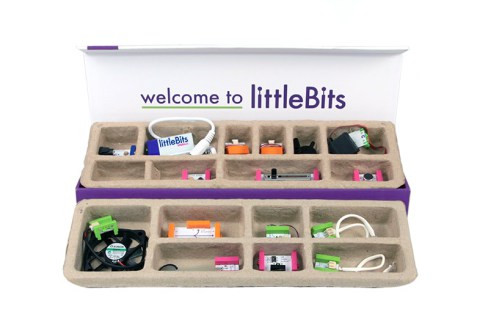
For this six weeks, I decided to go further into Engineering and try Computer Science. I was a bit worried at first because, I had never enjoyed STEM but there’s a first time for everything. Our first goal was to make a venn diagram of simple or complex computers, to organize our thoughts. We struggled at first, because our idea of simple computers actually turned out to be complex. Eventually we got the hang of it and finally played with the “littleBits” which are “electronic modules that snap together with magnets so you can invent anything!”

So we tried arranging them into different orders to make sounds, light, signals..etc. I found this really fun because it was like solving a puzzle and I had never used the littleBits before.littlebits-e1384644614560watch this!: https://www.youtube.com/watch?feature=player_profilepage&v=wDa3dOERxvA

For this module we were supposed to create something using the laser printer in our makerspace and the littleBits. We decided to make a lighthouse, from cardboard which was cut-out using the laser printer, and it would be able to light up, make sounds with the littleBits. We also decided to laser cut, waves for the scenery around the lighthouse. We are still completing our module but we we’re all very proud of how much we’ve accomplished and discovered throughout this module.

3D Letters! by: Catalina Gonzalez

Hello Blog Readers!
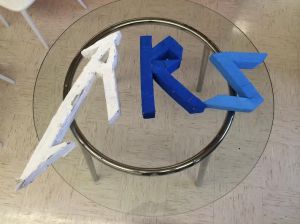
I want to talk about a cool module I’m doing for class with my friend Lucero. This module is called “Materials” and what we basically have to do is make 3D letters out of recycled materials and make them spell ARS or Ann Richards School. So, since Lucero and I are very lazy we decided to spell out ARS and make a star to go with it.
We started by looking at the fonts on the provided links. We looked at one called “Heavy Metal” and I got an idea. I said maybe we should make the “a” with the font Metallica uses and the rest of the letters with the “Heavy Metal” font. Lucero seemed to like that Idea so we sketched it and drew the letters on big blue butcher paper then cut them out. Then, we made a list of possible materials we could use and we looked for materials in the classroom. We found some sort of styrofoam and so we decided to make our letters out of that and paper mâché it then paint them. When I went home I did not notice my mom threw away the star we were going to use so we decided to just make the letters. So we cut the styrofoam to make them the same size as the paper we had cut out.
Once we hot glued the pieces we were ready to paper mâché. So, neither of us knew how to make paper mâché and neither did our teacher, so google came in handy! We looked it up and it said we had to use flour, water, and salt. We got our materials from our wonderful science teacher and followed the instructions on the internet. It said to put some water in a container and put the same amount of flour. Then to add some salt to avoid mold and mix nicely to make a glue like substance. We mixed the ingredients together for like an hour but when it was finally done we dipped newspaper strips in and started covering the letters.
They dried over the weekend and we got to paint them when we came back to school. We wanted to paint them different shades of blue since it’s our favorite color and it’s a school color. So we painted the “r” a dark blue and we mixed that blue and white to make it lighter and paint the “s”. But we didn’t know how to make a darker blue than the original so we painted the “a” white. We are very happy with the results of the module and now we have our wonderful letters spelling out ARS!
Thanks for reading!
Catalina Gonzalez

unnamed                A_Metallica_Userbox